


Let's be honest - analyzing lengthy documents is nobody's idea of a good time. You open a 47-page RFP, a 30-page partnership agreement, or a dense vendor contract, and suddenly you're on a treasure hunt for basic info: What's the deadline? What's the scope? What are the deal-breakers buried in section 8.3.2?
At Tekdi, we were doing this dance every week. Different RFPs, various partnership agreements, procurement documents - same tedious process of combing through pages to extract the stuff that actually matters. We tried generic document tools, but they either gave us walls of text or missed the context entirely. So we did what any frustrated dev team would do - we built our own solution.
Meet AI Document Analyser
It's an open-source tool that uses AI models to analyze documents the way you actually need them analyzed. Not some one-size-fits-all summary, but structured analysis based on what matters for each document type.
The big idea? Different documents need different lenses. An RFP analysis looks nothing like a partnership agreement analysis. A procurement contract needs different details than a service level agreement. So why should they use the same template?
What Makes This Different
Configure it your way Create document types for RFPs, partnership agreements, vendor contracts, legal documents, procurement tenders - whatever you're swimming in. Each type gets its own analysis framework. No coding required, just configuration. Below is an (oversimplified) example of how a legal document may be analysed.
{
  "type": "legal",
  "displayName": "Legal",
  "sections": [
    {
      "key": "summary",
      "label": "Summary",
      "prompt": "Extract the following key details from the RFP, citing page numbers for each:",
      "topics": [
        { "key": "documentName", "label": "Document Name", "prompt": "What is the document name?" },
        { "key": "parties", "label": "Parties Involved", "prompt": "Who are the parties involved?" },
        { "key": "dateOfAgreement", "label": "Date of Agreement", "prompt": "What is the date of agreement?"  }
      ]
    },
    { "key": "obligations", "label": "Obligations", "prompt": "Summarize the obligations." },
    { "key": "termination", "label": "Termination Clauses", "prompt": "Extract all termination clauses." },
    { "key": "disputeResolution", "label": "Dispute Resolution", "prompt": "What are the dispute resolution mechanisms?" },
    { "key": "confidentiality", "label": "Confidentiality", "prompt": "What are the confidentiality terms?" },
    { "key": "governingLaw", "label": "Governing Law", "prompt": "What is the governing law?" },
    { "key": "amendments", "label": "Amendments", "prompt": "How can amendments be made to the agreement?" }
  ]
}
Section-based breakdown Want your RFP analysis to have a Scope of Work section? Your partnership agreements to highlight Rights and Obligations? Your contracts to flag Payment Terms and Penalties? Define the sections you need for each document type, and each one gets its own prompt to extract relevant information.
Smart summaries The Summary section is special - it can have multiple sub-sections. For RFPs, we pull out Project Name, Submission Deadline, and Issuing Authority. For agreements, we extract Party Names, Contract Duration, and Governing Law. For procurement documents, we highlight Vendor Requirements and Evaluation Criteria. Think of it as a one-page cheat sheet customized for whatever you're reading.
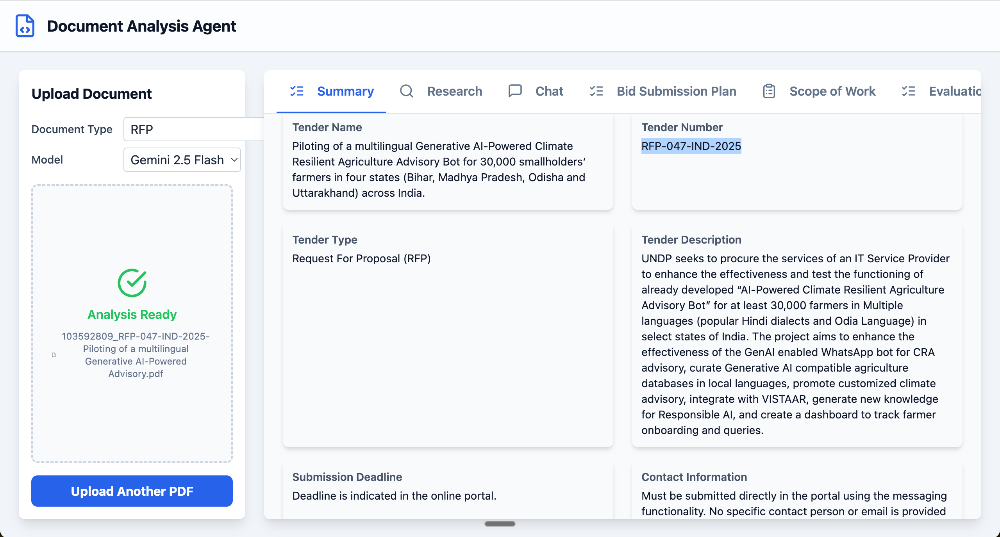
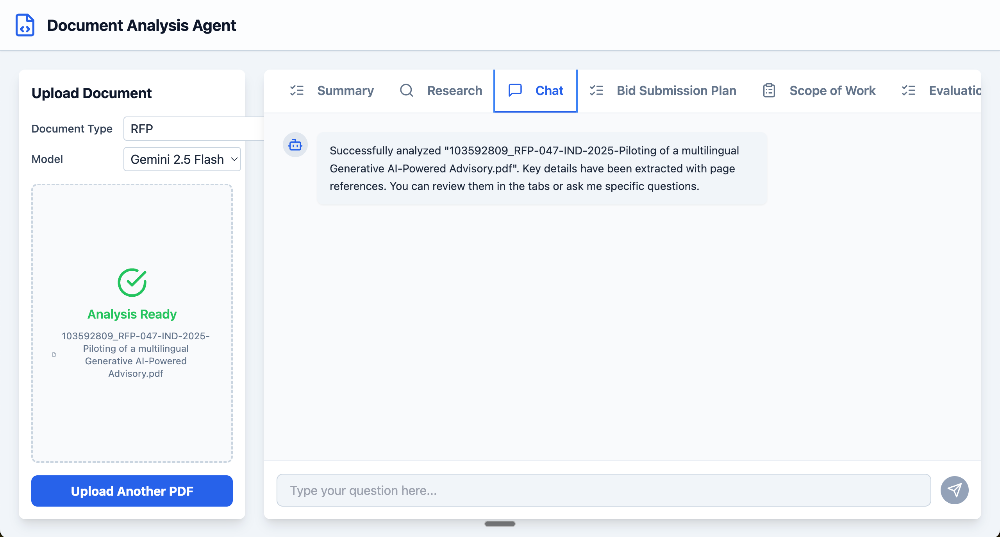
Ask questions There's a chat interface where you can ask the LLM questions about the document. "What are the payment terms?" for a contract. "Who are the key stakeholders?" for an agreement. "Are there any penalties mentioned?" for an RFP. The AI answers based on the actual document content.
Bring your own LLM We currently support OpenAI, Anthropic, and Google's models, but the architecture makes it easy to add more. Not locked into one AI provider means you can use what works for your budget and requirements.
How It Actually Works
Each section you define gets its own prompt template. When you upload a document, the LLM processes it through each section's lens. The Summary section is particularly clever - it can extract structured data points (like dates and names) alongside narrative summaries.
All of this lives in configuration files. Want to analyze a new type of document? Add a config. Want to tweak what gets extracted? Update the prompts. The tool adapts to your workflow, not the other way around.
Ready to Try It?
The code is open source and available on GitHub. You can deploy it yourself, or if you'd rather have help setting it up on your infrastructure, reach out to us at Tekdi - we're happy to help get you up and running.
We built this because we needed it. If you're spending hours each week extracting the same information from different documents, you probably need it too.
Try it out: github.com/tekdi/ai-document-analyser
Need help? Get in touch with Tekdi Technologies


